QR Code Printing on Branded Umbrellas for Event Tracking
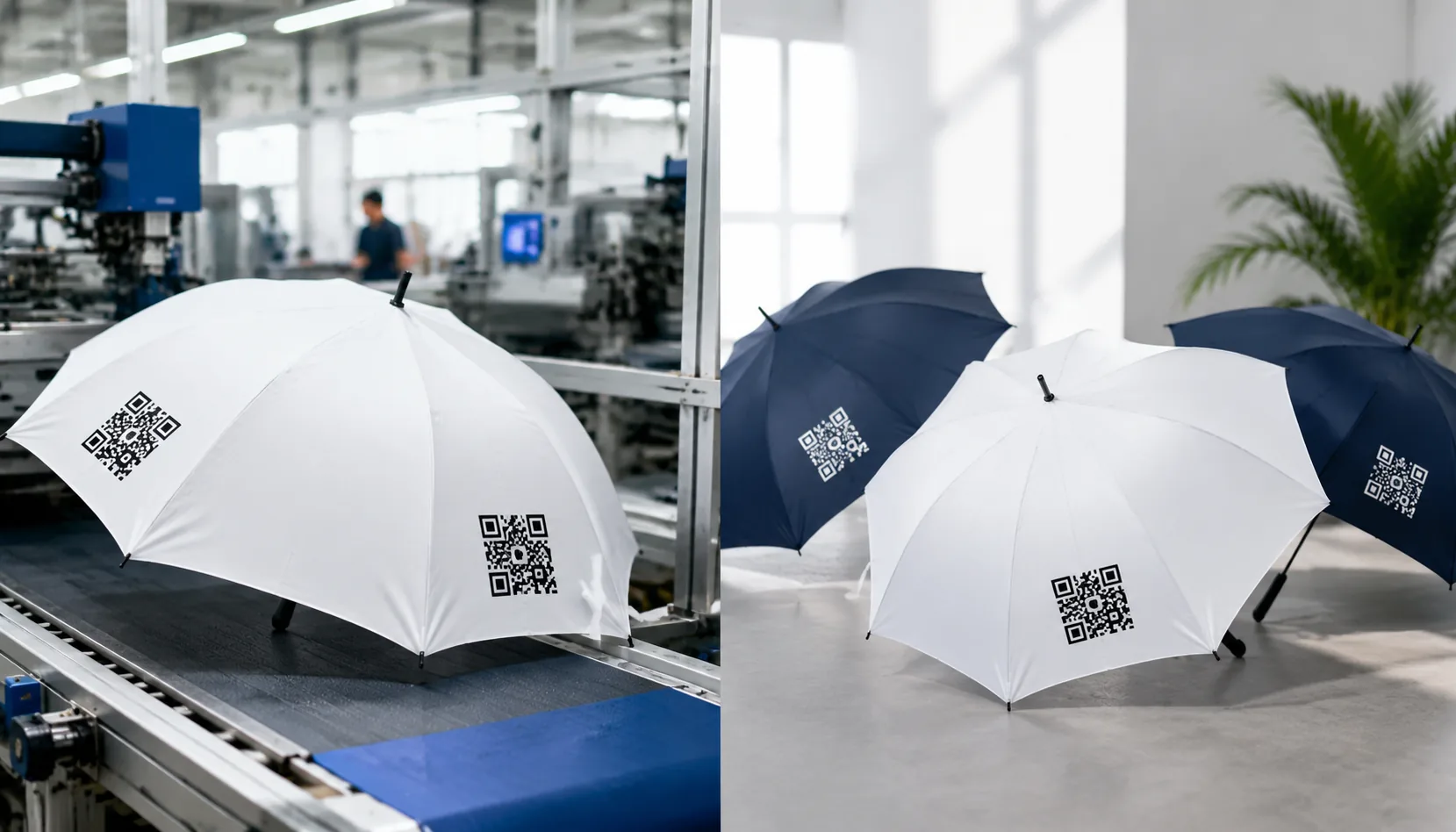
Event buyers do not just need a QR code printed on a canopy; they need it to scan quickly after folding, rain, glare, and crowd handling. With QR code umbrella printing, the risk is usually in small production details: logo clearance, ink spread on pongee, panel seam position, black-white contrast, and proof approval before bulk cutting. On our Songxia factory floor, we check these points before production so tracking campaigns survive the actual event.
When QR Codes Make Sense on Branded Umbrellas
QR code umbrella printing makes the most sense when the umbrella is part of a measurable offline campaign, not just a giveaway. For event check-ins, we usually print the code on one outer canopy panel where staff can scan from 3–6 ft away while guests queue; a 23" or 27" straight umbrella gives more readable surface than a compact 21" fold because the panel sits flatter when open. For app downloads, coupon campaigns, museum routes, tourism maps, and transport directions, the QR should lead to a mobile-first landing page with UTM tags or unique batch codes, not a generic homepage. I have seen buyers spend money on beautiful event umbrella branding, then lose tracking because every city, sponsor, and booth used the same URL. If you need sponsorship tracking, assign different QR codes by sponsor logo, event zone, or shipment carton so scans can be tied back to distribution.
Placement is the hard part because an umbrella canopy is not a poster; it is eight or ten curved fabric triangles pulled under tension over ribs. On 190T or 210T pongee, a printed QR placed too close to the seam can distort when the fabric stretches, especially on 8K steel frames where panel tension varies more than on fiberglass ribs. A scannable umbrella logo normally needs a quiet zone around the code, strong contrast, and enough size; for outdoor scanning, I prefer at least 80–100 mm square for close-range use and 120–150 mm if people will scan while walking past a booth. White code on black fabric looks stylish but often scans worse under rain glare, so black code on a white or light color patch is safer. Heat-transfer can hold sharp code edges, while screen printing works if the mesh, ink viscosity, and registration are controlled tightly.
Brand visibility still matters, so do not let the QR code swallow the canopy. For branded QR umbrellas, a good layout puts the main brand mark on one or two opposite panels and the promotional umbrella QR code on a panel that naturally faces the user at handover, photo moments, or entrance control. Double-canopy vented windproof umbrellas add another issue: the upper vent layer may interrupt the scan area if the code is pushed too high, so keep it on the lower visible field and away from rib tips. For retail or tourism programs, we sometimes combine a small map icon, short call-to-action, and QR in one print block, then run pre-production scan tests under daylight, indoor LED, and wet-canopy conditions. Our standard practice at ZheBrella is to test the final artwork on the actual fabric and coating, including Teflon or UV UPF 50+ finishes, before bulk printing because coatings can change glare and edge definition.
Minimum Size, Contrast, and Placement Guidelines
For QR code umbrella printing, size is not a design preference; it is a scan-distance calculation. For hand scanning at registration desks, hotel shuttles, or trade-show giveaways, I do not like going below 35 x 35 mm on the printed QR itself, and 45–55 mm is safer on 190T or 210T pongee because the weave and waterproof coating soften small modules. For distance scanning from 3–6 ft, such as a visitor photographing an opened umbrella in a queue, use 80–120 mm. On 23" and 27" straight umbrellas, that usually means one outer panel carries the code while the neighboring panel carries the brand mark. On golf umbrellas, 30" with 8K or 16K frames, 130–160 mm is realistic if the artwork is built as a true vector file, not a low-resolution PNG dropped into the layout.
Contrast matters more than brand-color loyalty. A promotional umbrella QR code should be dark code on a light field, ideally black or navy on white, silver-gray, pale yellow, or another clean background with at least a 4:1 contrast ratio. Reverse QR codes can work in lab samples but fail outdoors when rain gloss, Teflon coating, or heat-transfer film glare hits the canopy. Keep a quiet zone on all four sides equal to at least 4 QR modules; in production terms, we usually reserve 6–8 mm of blank space around a 50 mm code and 12–15 mm around a 120 mm code. Do not let ribs, seam allowances, binding tape, or panel stitch lines cut into that quiet zone, because phone cameras read the surrounding white border before they read the data pattern.
Outer-panel placement gives the best scan rate for branded QR umbrellas at outdoor events, but it needs to sit in the lower-middle of a panel, away from rib tips and the crown where fabric tension distorts the print. Inside-canopy placement is useful for VIP gifts or conference messaging because the user sees it while holding the umbrella, but it is poor for crowd tracking unless staff ask people to open the canopy. Sleeves are underrated for event umbrella branding: a 40–60 mm QR on a flat sleeve prints cleanly by screen print or heat transfer and scans before the umbrella is even opened. Straps are the weakest option; a scannable umbrella logo on a 20–25 mm strap is usually too narrow unless it links through a very low-density QR, and even then curvature and stitching reduce reliability. Our standard practice at ZheBrella is to test-scan one pre-production sample under indoor light, cloudy daylight, and wet-surface glare before approving bulk production.
Printing QR Codes on 190T and 210T Pongee
Fine QR modules fail first at the fabric level, not at the artwork file. For QR code umbrella printing, I prefer 190T or 210T pongee because the weave is tight enough to hold square edges without the ink feathering into the yarn gaps. A 23" or 27" canopy panel moves and curves, so a code that scans on a flat paper proof can become unreliable after cutting, sewing, and tensioning on 8K or 10K ribs. We normally ask buyers to keep the printed code at least 45-60 mm wide for close-range event scanning, with a quiet zone of 4 modules around the code. On dark pongee, a white underbase is not optional; without it, black modules lose contrast after water-repellent coating or Teflon finishing. The safest layout is a high-contrast black code on white or light-gray ground, placed away from seam allowances and rib tips where fabric distortion is highest.
Screen printing is still the most dependable method for a simple promotional umbrella QR code when the code is one color and the order is large enough to justify film and screen setup. A good factory controls mesh count, squeegee pressure, ink viscosity, and flash drying so the black blocks stay sharp instead of swelling by 0.2-0.4 mm. That sounds small, but on a dense QR matrix it can close white channels and break scan reliability under venue lighting. For event umbrella branding, I usually recommend screen printing when the buyer needs 500-5,000 pieces, a single landing page, and consistent placement across panels. We test scans before bulk production from 30 cm, 60 cm, and 1 m using iOS and Android phones, then again after canopy assembly because frame tension changes the printed geometry. AQL 2.5 inspection should include scan checks, not just color, registration, and rub resistance.
Digital printing works better when branded QR umbrellas carry campaign graphics, gradients, sponsor logos, or variable creative around the code. It gives more freedom on 210T pongee, especially for retail-style canopies where the QR is part of a full-panel design rather than a standalone mark. The risk is that rich CMYK backgrounds reduce contrast, so the scannable umbrella logo needs a protected white box or controlled contrast area. Heat-transfer printing is useful for smaller placements, such as a 50 mm code near a panel edge, sleeve, or tie wrap, because the transfer film can hold detail cleanly on short MOQ runs. I do not like transfers for oversized codes across seam lines, since edges can feel heavier and may age differently after folding. For event programs, confirm the URL before plate making, lock the QR version and error correction level, and run a pre-production sample 7-10 days before mass production.
Frame and Canopy Specs That Affect Scannability
Scannability starts with panel geometry, not the printer. On a standard 23" 8K umbrella, each canopy panel is wider and usually gives a cleaner landing area for a 70-100 mm promotional umbrella QR code, especially if the artwork sits 120-180 mm above the hem where curvature is moderate. A 16K frame looks premium, but the narrower panels create more seam interruptions and radial tension lines; if the code crosses a stitched seam or rib pocket, the modules stretch unevenly and cheap phones fail faster. For branded QR umbrellas, I prefer placing the code fully inside one panel with at least a 4-module quiet zone and avoiding the top third near the cap, where fabric puckering is worst. Fiberglass ribs flex back after gusts and keep more even canopy tension than low-cost steel ribs, which can take a set after bending and leave one panel slightly loose. That small looseness is enough to turn square QR modules into trapezoids under real event lighting.
Double-canopy windproof construction changes the scan result in two ways: it stabilizes the umbrella in wind, but it also adds overlap seams, vent stitching, and localized fabric lift. A vented 27" or 30" golf umbrella with fiberglass shaft and ribs may survive 50+ mph wind-tunnel testing, yet the outer canopy can billow between ribs when held at an angle, so the scannable umbrella logo should not sit near the vent cut line. Auto-open and auto-open-close mechanisms also matter because the spring force snaps the canopy into tension differently than a manual runner. A strong auto-open frame pulls 190T or 210T pongee tight and flat, which helps QR code umbrella printing, but an overpowered spring on thin POE, PVC, or EVA can create radial wrinkles after repeated cycling. For event umbrella branding, I would test after at least 20 open-close cycles, not just on the first sample fresh from sewing.
The writer should be blunt about testing: a QR code that scans on flat fabric before assembly has not been proven. Heat-transfer, screen print, and sublimation all behave differently once the canopy is stretched over 8K, 10K, or 16K ribs; sublimation on white pongee keeps fine edges well, while thick screen ink can bridge small modules if the code is below roughly 60 mm. Our standard practice at ZheBrella is to scan assembled pre-production samples from 0.5-1.5 meters, at straight-on and 30-degree angles, under warehouse light and outdoor shade, using both iPhone and Android cameras. If the umbrella includes Teflon water-repellent coating or UPF 50+ treatment, confirm adhesion and contrast after spray testing, because glare on coated fabric can reduce read speed. Final AQL 2.5 inspection should include a functional scan check by carton sampling, especially for event orders with tight lead times of 25-35 days and no chance to reprint before launch.
Approval, Data, and Delivery Planning
Approval should lock the QR artwork before bulk fabric cutting, not after the umbrellas are sewn. For QR code umbrella printing, I require a 1:1 digital proof plus a physical strike-off on the actual canopy fabric, because 190T pongee, 210T pongee, POE, PVC, and EVA all hold ink differently. A scannable umbrella logo that works on white paper can fail on navy pongee if the quiet zone is too small or the black ink bleeds into the weave. For event umbrella branding, the safest layout is usually a 30–40 mm QR code on one panel or a larger 60–80 mm code on two-panel artwork, with at least 4 mm clear space around it. Screen printing is durable for one-color high-contrast codes; heat transfer gives sharper edges for small modules; sublimation is useful on white polyester but risky for dense dark backgrounds. I do not approve bulk production until test scans pass on iPhone and Android at 0.5–1.5 meters under indoor and outdoor light.
Use redirect links unless the campaign absolutely requires a fixed destination printed into the code. A live direct URL is simple, but if the landing page changes after 5,000 branded QR umbrellas are already at the port, the factory cannot repair that mistake. A redirect domain lets the buyer update language, registration forms, UTM tags, or event schedules without changing the printed promotional umbrella QR code. For multi-city events, batch versioning is worth the small setup discipline: Batch A for New York, Batch B for Chicago, Batch C for Las Vegas, with separate QR files, carton marks, and packing lists. Our standard practice at ZheBrella is to name files by PO number, panel position, colorway, and destination URL, then scan the pre-production sample and three random pieces from the first bulk run. That prevents the common errors: old QR file used, designer-added border reducing contrast, mirrored artwork, or a shortened URL pointing to the wrong campaign.
MOQ and delivery planning should be based on the event date backward, not on the factory’s best-case production chart. A typical MOQ is 500–1,000 pieces for custom printed 23 inch auto-open umbrellas, higher if the frame, handle, or canopy color is custom dyed. Normal lead time is 7–10 days for sampling, 20–35 days for bulk production after approval, and another 5–7 days for inspection, packing, and export paperwork. For fixed event dates, FOB Ningbo or Shanghai works if the buyer controls freight; DDP is safer when the distributor needs landed delivery to a venue or warehouse, but the address, tax ID, and delivery window must be confirmed early. Final inspection should use AQL 2.5 with QR-specific checks added to the normal umbrella criteria: contrast ratio, missing modules, print blur, distorted corners, blocked quiet zones, and incorrect URLs. I also check frame function—manual, auto-open, or auto-open-close—because a perfect QR code on a defective umbrella still fails the event.
Frequently Asked Questions
Should the QR code be printed before or after the umbrella is assembled?
Most canopy graphics are printed before sewing, but the QR code must be scan-tested after assembly because panel tension and seams can distort it. Buyers should approve an assembled pre-production sample.
Can a QR code be printed in brand colors instead of black?
Yes, if contrast remains strong enough for scanning. Avoid low-contrast tone-on-tone codes, metallic inks, and busy backgrounds unless the factory verifies scans with multiple phones.
What QR code size is usually readable on a 23-inch event umbrella canopy?
For most canopy panels, a QR code should be at least 1.2 to 1.5 inches wide if it is printed on a single panel and viewed from a normal scanning distance. If the code is split across panels or placed near a seam, readability drops, so factories usually recommend keeping it on one flat area with enough quiet space around it.
Which printing method gives the best scan rate for branded QR umbrellas?
Screen printing works well for simple one- or two-color QR codes because it gives strong contrast and sharp edges. For full-color logos or complex event artwork, digital printing can work, but the final proof should be checked on the exact fabric to make sure the code still scans reliably.
How should a buyer approve QR umbrella artwork before mass production?
Ask for a vector proof showing the exact QR code size, logo position, and seam layout, then request a physical sample or high-resolution scan test. For event orders, many buyers also confirm delivery timing after proof approval, since production often starts only once artwork is signed off.
Looking to Launch Your Custom Umbrella Line?
ZheBrella is a Zhejiang-based OEM/ODM umbrella manufacturer with 17 years of export experience. Free design, low MOQ from 100 pieces, windproof construction, full-color print.
Get Free Quote Now »People Also Search For
Related Articles
QR Code Printing on Umbrellas for Campaign Tracking
Use QR code umbrella printing with readable sizing, durable placement, and QC checks so event and retail campaigns can d...
Read More »
QR Code Printing on Promotional Umbrellas for Campaigns
Plan scannable QR code umbrella printing with the right panel size, contrast, fabric, testing, MOQ, and delivery terms f...
Read More »
QR Code Logo Printing on Umbrellas for Event Branding
Design scannable QR code umbrellas with correct sizing, contrast, placement, sampling, and QC for events, retail activat...
Read More »