Umbrella Panel Count, Seam Layout, and Print Registration
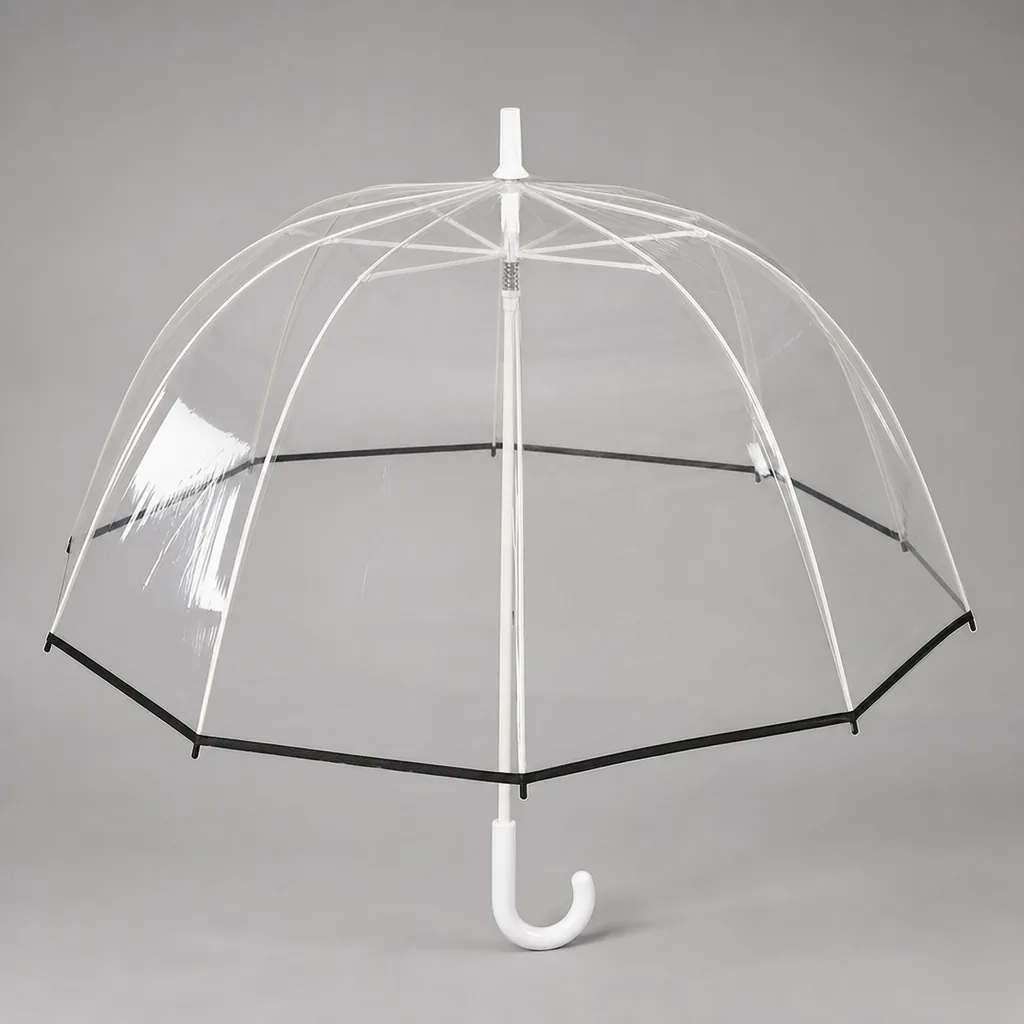
For OEM buyers, umbrella panel count is not just a design choice; it affects logo alignment, seam tolerance, wind balance, and how much usable fabric a factory can actually cut from each roll. On the production floor, small shifts in panel width or seam placement can move a print off center, distort registration, or create waste that changes unit cost and lead time. Managing those tradeoffs early is what keeps branded umbrellas consistent at scale.
Why panel count changes logo placement
Umbrella panel count controls the real printable area, not just the shape of the canopy. A 6K layout gives you wider canopy panels, so a centered logo or a simple repeat can sit on one face with fewer seam interruptions. By the time you move to 8K and 10K, each panel gets narrower, which reduces the usable width for a clean graphic and forces more logo breaks across seams. With 16K, the canopy panels are so narrow that a centered logo often has to be reduced, split, or moved lower to avoid crossing too many stitch lines. In production, umbrella panel count is the first thing I check before promising print size, because the artwork may look fine on a flat template but fail once the panel taper and seam allowances are added.
The umbrella seam layout changes how a logo reads from a distance. A wide mark can be centered on one panel in 6K, but in 8K or 10K it may need to be reworked into a repeated element that sits within each canopy panel instead of spanning the full face. That is where print registration becomes critical: if the seam shifts even a few millimeters, the eye catches the mismatch immediately on bold lettering or geometric borders. Our standard practice is to map the seam layout against the artwork before sampling, then decide whether the print should avoid the seams, intentionally cross them, or be broken into panel-by-panel placements. For premium retail umbrellas, we usually keep important text away from stitch lines so the logo alignment holds when the canopy is opened under tension.
A single large graphic becomes impossible once the panel width is smaller than the art’s minimum readable span. On 10K and especially 16K canopy panels, a full-face illustration can lose proportion because the image is cut into narrow wedges and the top and bottom edges taper differently from panel to panel. In that case, the better solution is either a smaller centered logo, a circular mark that tolerates seam breaks, or a layout built as a repeat across multiple panels. The production limit is not just visual; it is also mechanical, because fabric stretch, hemming, and rib placement all change final registration after sewing. If the customer wants a broad hero image, I usually push them toward fewer panels, a vented double-canopy with larger faces, or a different product format where the print area is genuinely flat enough to hold the artwork without distortion.
Set panel width before you set artwork
Arc size by itself is not enough to quote or approve artwork. The spec that matters first is umbrella panel count and the actual panel width in mm or inches, because two umbrellas with the same 23-inch or 27-inch size can have very different seam geometry. An 8K frame usually gives wider canopy panels and fewer interruptions across a logo, while 10K or 16K constructions split the surface into narrower segments that force more breaks in the image. If you only say “58-inch arc,” the factory has to guess how the umbrella seam layout will treat text, borders, and gradients. Our standard practice is to confirm the flat panel width before prepress, then build the artwork around the real canopy panels instead of the marketing dimension.
Narrow panels create more waste on full-wrap prints because each seam interrupts the image and increases the area that must be trimmed, folded, or hidden in registration allowances. That matters for print registration, especially on promotional umbrellas with large logos, city maps, or photo-based graphics, where a 3-5 mm shift can make the logo alignment look sloppy at the panel joins. On a POE or pongee 190T canopy, the seam allowance and thread line also eat into the usable print area, so a design that looks fine on screen may lose letters at every rib line. If the customer wants continuous artwork, I push for wider canopy panels, fewer panels, and a layout that keeps critical text away from the seams. Otherwise, the artwork should be split intentionally so the umbrella panel count works with the design instead of fighting it.
Match print method to seam geometry
The first thing to check is the umbrella panel count and where the seams fall, because the print method has to work with the geometry, not against it. On an 8K or 10K canopy, screen print is the least forgiving when artwork crosses a seam: once the fabric is cut and sewn, the panel edge lifts, stretches, and changes direction, so a hard-edged logo can break or shift at every stitch line. In practical terms, I treat 2 to 3 mm of print registration error as normal on sewn canopy panels, and I would not promise tighter than that on production umbrellas. If the logo sits entirely inside one panel, screen print is fine. If the artwork needs to span multiple panels, the umbrella seam layout becomes part of the artwork spec, not just a sewing detail.
Heat transfer gives more control for smaller runs and multi-color graphics, but it still needs seam-aware placement. A flat transfer applied before final assembly can look clean, yet once the canopy is tensioned, the print registration can move slightly with the fabric grain and panel curvature. For logos that cross seams, keep critical text and thin outlines at least 5 to 8 mm away from the stitch line so the edge distortion does not become visible in use. If the art must land across adjacent canopy panels, I usually ask for a clear centerline reference and a full-size template with seam allowances marked. That is the only way to keep logo alignment consistent from sample to bulk run, especially on smaller umbrellas where panel width is narrow and every millimeter matters.
Sublimation is the best option when the artwork is intended to flow across the entire canopy, because the ink goes into the fabric and tolerates complex gradients, photos, and wraparound graphics better than screen or transfer. It is still not immune to cutting and sewing variation, so edge-to-edge art needs a larger bleed, usually 10 to 15 mm beyond the final trim line, and more if the design includes borders or type near the edge. Without that extra bleed, a slight shift during cutting will expose a white edge or create a broken line at the seam. For umbrellas with a high umbrella panel count, sublimation is the most reliable way to preserve the visual continuity of a large graphic, but the file must be built around seam layout, not after the fact.
Coordinate panel count with fabric and construction
Umbrella panel count is not just an aesthetic choice; it has to match the cloth and the frame. On 190T pongee, the weave is lighter and stretches a bit more under tension, so a high panel count can expose small differences in cutting and sewing more quickly. With 210T pongee, the hand is tighter and the canopy holds its shape better, which gives cleaner panel lines and more predictable drape. On fiberglass frames, the ribs flex and recover, so the canopy sees less point loading at the seams. Steel frames are stiffer, which can make the fabric take more direct stress at the tips and stretch points, especially on larger 23-inch and 27-inch styles. In practice, umbrella panel count should follow the combination of cloth weight, rib material, and finished diameter, not a generic catalog look.
A higher umbrella panel count helps when the frame geometry actually needs finer shaping. An 8K or 10K umbrella can benefit from more canopy panels because the smaller segments distribute load better along the seam layout, especially on vented or windproof structures where the canopy has to deform and recover without ballooning. That is useful on fiberglass frames, where the flex works with the fabric instead of fighting it. On a stiffer steel frame, adding panels can still improve coverage on a deep dome, but beyond a certain point the gain is mostly cosmetic. If the product is a basic straight umbrella with a standard canopy profile, extra canopy panels often just add cutting, stitching, and inspection time without a meaningful wind-stability benefit. That is where cost goes up faster than performance.
Print registration gets harder as the canopy panels multiply. Each seam introduces a small shift, so a large logo that crosses multiple panels needs tighter control of panel cutting, stitch allowance, and panel numbering during sewing. With 190T fabric, the slight stretch can pull artwork off center after tensioning, so logo alignment has to be planned with the finished open shape, not just the flat pattern. On 210T pongee, registration holds better, but the artwork still needs to be placed around the umbrella seam layout so major elements do not land on a seam peak or a rib pocket. Our standard practice is to confirm print registration on a sewn sample before production when the design crosses more than two canopy panels. If the artwork is simple and centered, a lower panel count is usually safer and cheaper. If the design is a full-repeat or segmented graphic, more panels can work, but only if the factory controls cutting and sewing closely from the start.
Build a buyer spec sheet the factory can follow
The first thing I lock down is the umbrella panel count, because it drives the cutting die, seam layout, and how the artwork lands across the canopy panels. A 6K, 8K, 10K, or 16K frame does not behave the same once you move from a plain color canopy to a printed one. Buyers should specify finished diameter, panel count, panel width at the hem and at the crown, rib length, and whether the pattern must mirror or repeat from panel to panel. If that is vague, the factory will guess, and guessing is where logo alignment starts drifting. Our standard practice is to build the spec sheet around the actual panel geometry, not just the umbrella size, because that is what the cutter and sewing line need to execute cleanly.
Next, define the umbrella seam layout with numbers the production team can measure. State seam allowance in millimeters, stitch type, reinforcement patch size, and where the print zone begins and ends relative to the center of each panel. For artwork, attach vector files and lock PMS references for every color that matters, including background panels and logo ink, not just the brand mark. If a logo crosses seams, the buyer should approve a seam map showing how the image breaks and re-joins across adjacent canopy panels. That is the only reliable way to control print registration on curved fabric, especially on pongee 190T or 210T where stretch, heat, and tension can move the image by a few millimeters during sewing.
Sampling tolerance should also be written down before the sample is cut. I specify acceptable deviation for panel width, panel count confirmation, print placement, seam offset, and logo alignment, usually with a visual limit and a numeric limit so there is no argument later. For final inspection, AQL 2.5 is a reasonable baseline for export orders, but the buyer should state whether that applies to appearance, function, and carton packing together or as separate checks. If the order includes multiple colors or multiple artwork positions, the spec should require pre-production approval of one signed sample per variant. That keeps the factory, the buyer, and QC looking at the same target instead of interpreting the umbrella spec differently on each side.
Frequently Asked Questions
How many panels should a branded umbrella use?
For most promo and retail umbrellas, 8K or 16K layouts are easiest to decorate cleanly. Use wider panels when you need larger logo areas, and more panels when wind balance or folding geometry matters.
Does more panels always mean better print quality?
No. More panels create more seams, which can break up large graphics and increase sewing cost. The right count depends on artwork size, canopy diameter, and whether the print must cross seams.
How many panels are best for a branded umbrella with a large logo?
For large logos, 8-panel and 10-panel canopies are usually easier to register than 12-panel or 16-panel builds because each panel is wider. If the artwork must cross seams, we usually allow a 2 to 3 mm registration tolerance per seam during sampling.
Does changing panel count affect factory yield on OEM umbrella orders?
Yes. Higher panel counts increase cutting and sewing steps, which can lower yield and raise labor cost. For most OEM programs, 8-panel umbrellas are the most efficient for production, while 12-panel and above are typically used when the design or wind-performance target justifies the extra cost.
What lead time should a buyer expect for custom seam-matched umbrella printing?
Sampling usually takes 7 to 10 days after artwork approval, and bulk production is often 30 to 45 days depending on quantity and print method. If the logo must match across seams, add time for strike-off approval and an extra pre-production check.
Looking to Launch Your Custom Umbrella Line?
ZheBrella is a Zhejiang-based OEM/ODM umbrella manufacturer with 17 years of export experience. Free design, low MOQ from 100 pieces, windproof construction, full-color print.
Get Free Quote Now »People Also Search For
Related Articles
Umbrella Print Methods for Panels, Sleeves, and Handles
Choose the right print process for umbrella panels, sleeves, and handles with clear limits on color count, placement, MO...
Read More »
Refined Logo Placement Specs for Branded Umbrella Canopies
Plan logo placement on umbrellas with clear specs for panel size, safe zones, seam breaks, and repeat-order consistency ...
Read More »
Umbrella Print Registration Tolerance for Clean Branding Results
Set practical print registration tolerances for umbrellas, including panel alignment, bleed, and QC checkpoints that hel...
Read More »