Branded Umbrella Border Printing for Clean Retail Displays
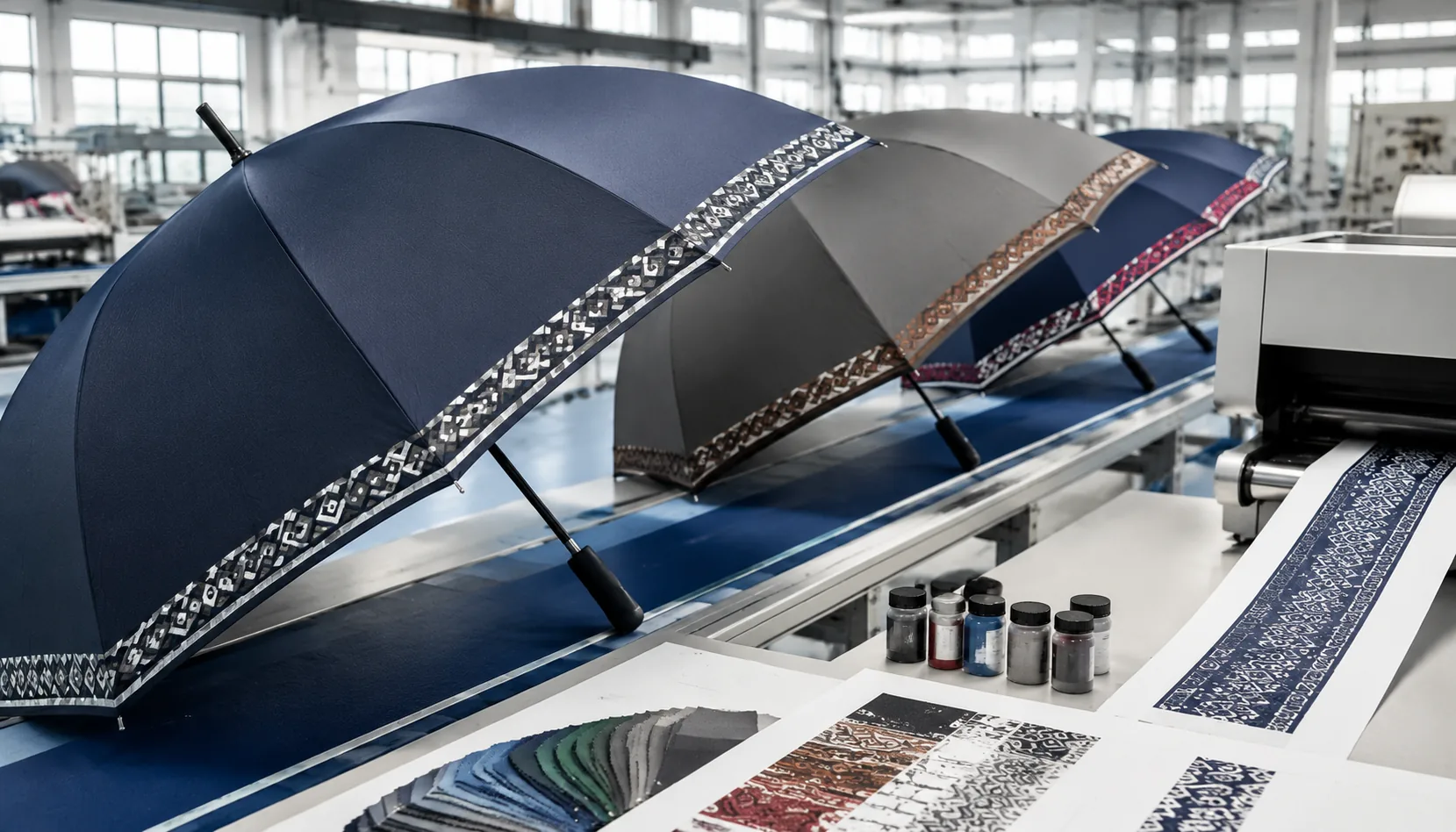
A retail umbrella has only a few seconds to look organized on the shelf, and a busy all-over print can make the logo harder to read. On our Songxia production floor, umbrella border printing is often the cleaner solution: it frames the canopy edge, keeps the center panel open for branding, and reduces ink coverage without making the product look plain. The key is matching border width, panel alignment, and screen setup before bulk cutting starts.
Why Border Printing Works for Branding
Border artwork works because the eye reads the umbrella outline before it reads the individual panels. A clean band around a 23" or 27" canopy creates a brand frame that stays visible whether the umbrella is fully open, angled on a retail rack, or photographed from waist height at an outdoor event. With umbrella border printing, the main canopy can remain a solid 190T or 210T pongee color while the edge carries the logo repeat, slogan, or stripe system. That is usually stronger than filling all 8K panels with artwork, especially for retail umbrella branding where shoppers compare several SKUs on a wall hook or floor stand. A 35–60 mm border is enough for most canopy border logo layouts; wider than 80 mm starts to compete with the canopy color and can look heavy on compact 21" folding umbrellas.
The production advantage is control. Full-panel artwork crosses seams, rib tips, and panel curvature, so a small registration shift becomes obvious after sewing. A branded umbrella edge print sits near the hem, where the visual line is continuous and easier to check during AQL 2.5 inspection. For screen printing, we normally keep fine text above 6 pt and avoid logo elements thinner than 0.3 mm; for heat transfer or sublimation, gradients and multi-color repeats are possible, but the border still needs seam allowance planning. On a double-canopy vented windproof model, I prefer the print on the outer lower edge, not near the vent overlap, because the message stays readable when the canopy flexes in 50+ mph wind testing.
Border printing also gives better photo consistency. Event planners and retail brands often need umbrellas to look uniform across lifestyle shots, e-commerce thumbnails, and in-store displays; a perimeter repeat keeps the logo visible from many angles without turning the umbrella into a billboard. A good promotional umbrella print layout leaves 70–85% of the canopy visually quiet, which makes Teflon-coated navy, black, beige, or custom Pantone fabric look more premium. At ZheBrella, our standard practice is to confirm a 1:1 paper print or digital panel mockup before sampling, because the border must align with the cut panel shape, rib count, and final hem width—not just look good as a flat circle on a PDF.
Choosing Border Width and Placement
For retail displays, border width should be chosen from the viewing distance first, not from the artwork file. A 1 inch border looks clean on a 21 inch compact umbrella, but it can disappear on a 27 inch golf model hanging above eye level. I usually recommend 1.5 to 2 inches for most 23 inch and 27 inch retail umbrellas using 190T or 210T pongee, because it gives enough print area without making the canopy look heavy. A 3 inch border can work for fashion or event programs, but only if the canopy color is simple and the logo is not fighting with a large central panel graphic. With umbrella border printing, remember that the curved canopy shortens the readable vertical height after sewing and tensioning, so a 25 mm logo in the file may visually read closer to 20 mm on the finished umbrella.
Single-edge layouts are better when the umbrella sits in a rack with one face forward, especially for department-store or museum-shop programs where the same branded umbrella edge print needs to align consistently. Full-perimeter borders are stronger for outdoor activations, resort retail, and promotional umbrella print layout work where the umbrella may be seen from any angle. The trade-off is registration: every panel seam interrupts the repeat, and a logo placed too close to a seam will look chopped after binding tape and stitch allowance take 5 to 8 mm from the edge. Our standard practice at ZheBrella is to keep logos at least 15 mm away from panel seams and avoid putting small text across the rib line. If the border includes a stripe plus a canopy border logo, the stripe should carry the continuity while the logo repeats inside each panel.
Rib count changes the artwork math more than many buyers expect. An 8K umbrella has eight wider panels, so each panel gives more horizontal room for a readable logo repeat; on a 23 inch 8K canopy, a 70 to 90 mm wide logo usually sits comfortably inside the border without crowding the seams. A 16K umbrella has narrower panels and twice as many seam breaks, so repeating the same logo on every panel often makes the retail umbrella branding look busy and small. For 16K, I prefer alternating-panel repeats or a continuous geometric border with the logo placed on four opposing panels. If the logo includes fine serif text, avoid shrinking below about 45 mm wide on 190T pongee, and larger is safer on textured RPET fabrics. Always confirm placement on a sewn pre-production sample, not only on a flat digital mockup.
Fabric, Ink, and Color Decisions
Fabric choice decides whether a border print looks like a retail product or a cheap giveaway. For most branded umbrella edge print orders, I prefer 190T pongee for promotional 21" and 23" auto-open umbrellas because it folds cleanly, accepts ink evenly, and keeps cost under control at normal MOQ levels. For retail umbrella branding, 210T pongee is safer: tighter yarn, smoother hand feel, better color depth, and less show-through when the border is dark navy, black, or red. If the umbrella needs outdoor-event performance, we specify silver or black glue coated UPF 50+ fabric, but buyers should understand the coating changes ink behavior. A coated canopy may pass UV requirements but need adjusted curing temperature, especially on heat-transfer logos near the hem. PVC, POE, and EVA clear umbrellas are a different job entirely; border printing on those materials needs adhesion testing because standard pongee ink systems will not bite properly.
Dark borders are the most common mistake in umbrella border printing because they make the layout look strong on a PDF and weak on fabric. A black or deep navy border can swallow a charcoal, burgundy, or forest-green logo once the canopy curves over 8K fiberglass ribs or steel ribs. I usually ask for at least 60% tonal separation between the border and the canopy border logo, and white underbase is not optional when printing light marks over saturated fabric. Pantone matching also needs realism: pongee absorbs differently than paper, and Teflon water-repellent treatment can slightly flatten bright orange, lime, or cyan. For retail displays, keep the border width consistent across panels, usually 45–70 mm on a 23" canopy and 70–100 mm on a 27" golf umbrella. If the logo repeats around all eight panels, registration tolerance should be agreed before sampling, not argued during AQL 2.5 inspection.
Printing method should follow the artwork, not the buyer’s habit from T-shirts or tote bags. Screen printing is still the best choice for solid color bands, simple type, and repeat logos because it gives dense coverage, clean edges, and stable cost on 500–5,000 pcs runs. Digital printing is better when the promotional umbrella print layout uses gradients, photographic graphics, or multi-color border artwork wrapping across panels; it avoids multiple screens but needs careful profiling so the border does not shift panel to panel after cutting and sewing. Heat transfer works well for small crisp logos near the hem, especially metallic marks or fine type under 8 mm stroke width, but large transfer borders can feel stiff and may crack if folded tightly in cold weather. Our standard practice at ZheBrella is to run a pre-production panel test before bulk umbrella border printing, then check adhesion, rub resistance, color, and open-canopy alignment before approving full cutting.
Frame Choices That Support the Look
The frame decides whether a border design looks straight in a retail rack or starts waving like a cheap flag after two uses. For umbrella border printing, I prefer fiberglass ribs when the artwork runs around the canopy edge because fiberglass flexes and returns without permanently bending the panels out of shape. On a 23" or 27" stick umbrella, 8K fiberglass ribs with a steel shaft are a practical middle ground; for higher wind claims, 10K or 16K fiberglass spreads canopy tension more evenly and keeps the printed band from looking scalloped. If the buyer wants a 190T or 210T pongee canopy with a 25–35 mm border stripe, the rib length tolerance matters more than many people think. A 3 mm mismatch between ribs can make a clean canopy border logo look off-center at the tips, especially on dark fabric with white ink.
Steel ribs still have a place when the program is cost-sensitive, especially for supermarket, campus, and event umbrellas where the target is volume rather than a premium hand feel. A steel 8K frame on a 21" folding umbrella or standard 23" straight umbrella can support a branded umbrella edge print well if the canopy is cut accurately and the sewing allowance is controlled. The trade-off is recovery after inversion: steel can deform after a hard gust, so I do not recommend it for claims above basic urban rain use. For retail umbrella branding, this is where specification discipline matters. If the artwork sits near the hem, we keep the print safely above the stitch line, usually 10–15 mm clear, so screen printing, heat transfer, or sublimation does not get distorted by the final edge seam.
Auto-open frames are a smart match for corporate gifts because the opening action shows the full border in one clean movement, which is useful when the promotional umbrella print layout depends on a continuous ring or repeated logo spacing. On 23" auto-open straight umbrellas, we normally pair a metal shaft with fiberglass ribs to balance price and perceived quality; on compact auto-open-close models, the border artwork must allow for tighter panel curvature and smaller visible real estate. For golf umbrellas, double-canopy windproof construction is the better platform. A 27", 30", or 32" vented canopy with 8K or 10K fiberglass ribs can survive 50+ mph wind-tunnel testing when built correctly, and the lower canopy border remains the primary branding zone while the vent layer handles pressure release. Our standard practice at ZheBrella is to approve a pre-production sample under AQL 2.5 before releasing bulk cutting.
Buyer Checklist for Bulk Orders
Lock the artwork before you talk price, because umbrella border printing exposes every weak file setup. For a clean retail shelf, ask your supplier to confirm the open-diameter scale, not just a flat AI/PDF view; a 23" umbrella usually has about 102–105 cm open arc, while a 30" golf umbrella can run 130–135 cm, so a 20 mm canopy border logo reads very differently. Specify Pantone C targets for screen print or heat-transfer ink, and request a lab dip or strike-off when the color must match packaging. I prefer keeping text at least 12–15 mm high on 190T or 210T pongee, because smaller letters break on stitched panels and look fuzzy after water-repellent coating. For a branded umbrella edge print, define whether the artwork follows each panel edge, crosses seams, or repeats once per panel; those are three different production risks.
Border tolerance should be written into the purchase order before bulk fabric is cut. On standard 8K manual or auto-open umbrellas, a realistic print-position tolerance is usually ±5 mm from the canopy edge; for 10K or 16K frames with more seams, allow ±6–8 mm unless you are paying for tighter panel matching and slower sewing. The approval sequence should include digital layout, Pantone confirmation, blank frame/canopy size approval, printed panel sample, and one finished pre-production sample. Our standard practice at ZheBrella is not to release bulk cutting until the buyer signs the finished sample, because once 3,000 panels are cut, a 10 mm border mistake becomes scrap, not a discussion. For retail umbrella branding, also check hangtag placement, sleeve print alignment, barcode readability, carton marks, and whether the canopy border logo remains visible when folded in the sleeve.
MOQ depends on the print method and fabric stock. For stock 190T pongee with screen or heat-transfer border art, 500–1,000 pcs per design is common; custom-dyed fabric, full-panel sublimation, or complex promotional umbrella print layout usually starts around 1,000–3,000 pcs. Sampling normally takes 5–7 days for a printed panel and 7–12 days for a finished umbrella sample after artwork approval, while bulk production is often 25–40 days depending on rib count, handle, coating, and peak-season capacity. Put AQL 2.5 criteria in writing: inspect print position, ink bleeding, color deviation, seam puckering, rib function, auto-open or auto-open-close reliability, canopy tension, sleeve fit, and carton packing. Quote both FOB Ningbo or Shanghai and DDP destination if you need landed-cost comparison; FOB shows factory discipline, while DDP exposes duty, freight, and last-mile assumptions that can change the real unit cost.
Frequently Asked Questions
What is the safest border width for umbrella printing?
A 1–3 inch border is usually production-friendly, depending on umbrella size and panel curvature. Very narrow borders can show sewing variation more clearly.
Can border printing be used on UPF 50+ umbrellas?
Yes, but the factory should confirm ink adhesion and color appearance on the coated fabric. A strike-off sample is recommended before approving bulk production.
What artwork format is best for umbrella border printing?
Vector files such as AI, EPS, or PDF are preferred because the border print must align cleanly around curved canopy panels. Artwork should include Pantone colors, repeat spacing, and a safe margin from seams and the hem.
Does border printing cost less than printing large logos on every panel?
In many OEM orders, a one-color or two-color border print can be more cost-efficient than full-panel coverage because it uses less ink and keeps setup simpler. Final cost depends on logo length, number of colors, canopy size, and order quantity.
What is the usual MOQ and lead time for branded umbrella edge printing?
Typical MOQs start around 500 to 1,000 pieces per design for custom border printing. Sampling usually takes 7 to 10 days after artwork approval, with bulk production commonly around 30 to 45 days depending on season and materials.
Looking to Launch Your Custom Umbrella Line?
ZheBrella is a Zhejiang-based OEM/ODM umbrella manufacturer with 17 years of export experience. Free design, low MOQ from 100 pieces, windproof construction, full-color print.
Get Free Quote Now »People Also Search For
Related Articles
Gradient Umbrella Printing for Retail and Event Branding
Learn when gradient umbrella prints work best, how digital files should be prepared, and which canopy specs support smoo...
Read More »
White Ink Underbase for Dark Umbrella Canopy Logos
Learn when white underbase improves logo opacity on dark umbrella canopies, with fabric, ink, sampling, MOQ, and QC tips...
Read More »
All-Over Repeat Pattern Umbrellas for Retail Branding
Plan repeat-pattern umbrella prints with cleaner panel joins, practical fabric choices, MOQ expectations, and approval s...
Read More »