Best Logo Placement for Folding Umbrellas by Panel Count
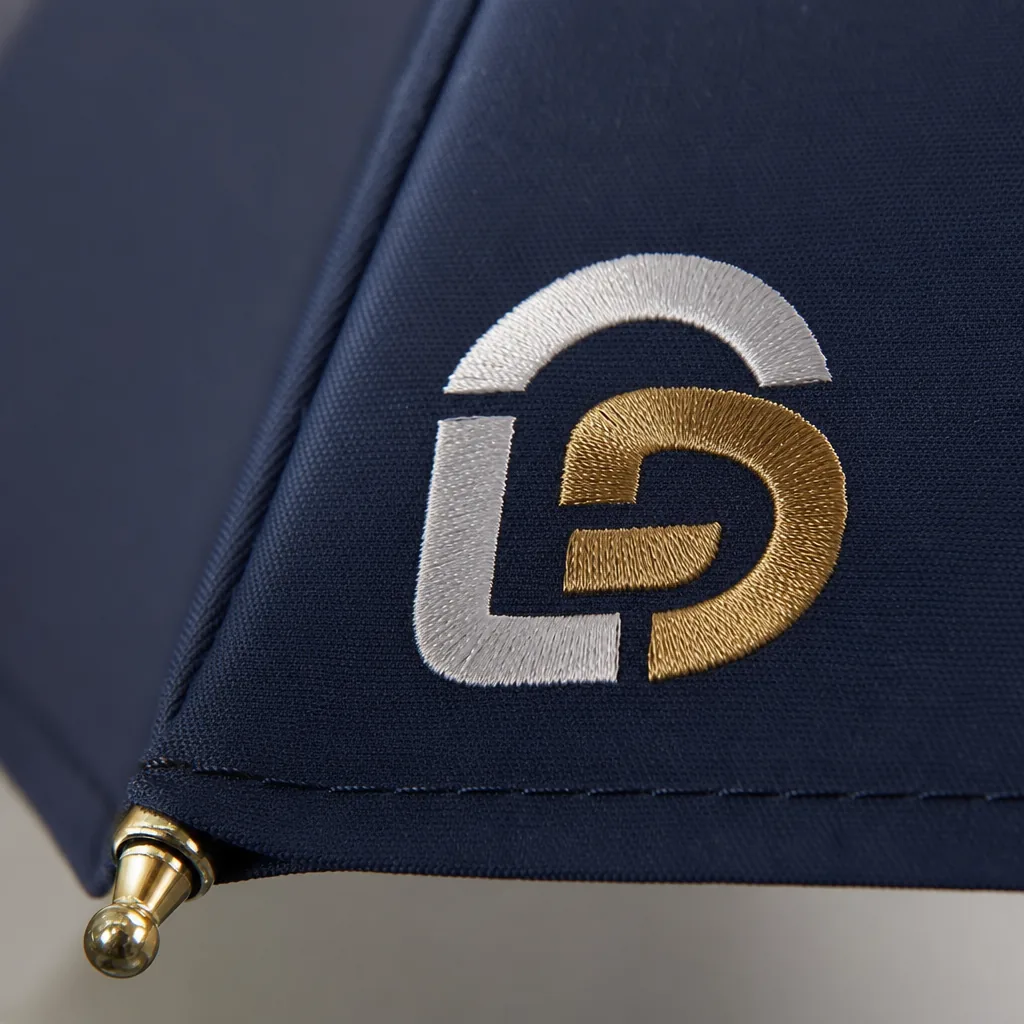
On folding umbrellas, logo position is not just a design choice; it changes with the frame count, panel width, seam layout, and how the canopy sits on the printing table. A 6K umbrella gives fewer but wider panels, an 8K balances readability and cost, and a 16K can make a large mark look broken if the artwork ignores the ribs. Good folding umbrella logo placement starts by matching the buyer’s branding goal to the actual canopy geometry before sampling.
How panel count changes the available print zones
Panel count defines the usable canopy print area before screen print, heat transfer, or sublimation artwork is approved. Fewer ribs create wider triangular panels, so the logo can extend farther left to right before it reaches seam allowance, bartacks, rib tips, or edge binding. On a 6K folding canopy, the panel is wide near the hem but narrows quickly toward the top cap; the safest position is the lower-middle third with 20-30 mm clearance from both seams and 35-45 mm from the binding. That space fits a horizontal wordmark, one-color event logo, or bold graphic for promo umbrellas. The tradeoff is fabric stability: 6K folding models are less common for retail-grade orders because wide panels can flap between ribs, especially on 190T pongee in wind. Use this folding umbrella logo placement only when maximum visual size matters more than tight registration or fine detail.
An 8K canopy is the standard choice for 21 inch and 23 inch 3-fold umbrellas because panel width, rib count, and sewing tolerance stay balanced. A typical 8K panel can often hold a 160-190 mm wide logo, depending on fabric and coating. 190T pongee has more give, 210T pongee feels tighter, and coated fabrics may reduce stretch while making press marks easier to see. For screen print, keep small text above 8 pt and hold thin strokes at least 15-20 mm from seams, where canopy curvature and seam allowance can distort squeegee pressure. Heat transfer gives sharper edges but still needs a flat press zone and cannot cross the rib channel. This is the most practical panel count branding format: one panel for corporate gifts, alternating panels for event visibility, or two opposite panels when the buyer wants stronger display without adding too many print setups.
A 16K canopy improves roundness and gives a more premium hand feel, but the narrow panels reduce maximum safe logo width. On compact 16K folding umbrellas, a wide rectangular brand mark may need to shrink to 80-120 mm or change to a stacked logo, badge, or vertical layout. Splitting a long name across adjacent panels is risky unless the design can tolerate a visible seam interruption; repeated opening and closing can make small registration shifts more obvious. More seams also raise production risk: ink can build at stitch lines, transfer edges can lift, and sublimation artwork can drift where fabric tension changes. For folding umbrella logo placement on 16K models, repeated compact marks on selected panels usually perform better than one long mark. On windproof double-canopy styles, vent overlap reduces the printable area again, so approve artwork against the actual cutting pattern, not a generic umbrella mockup.
Front panel, alternate panel, and repeated logo layouts
Use a single front-panel logo when the buyer wants retail-style folding umbrella logo placement instead of a giveaway look. On a standard 21" or 23" three-fold umbrella with 8K steel or fiberglass ribs, the forward-facing panel is the position most people see when the user carries the umbrella in front, making it suitable for banks, hotels, universities, and corporate gift programs. Keep artwork inside the practical canopy print area: 25-35 mm from seam stitching and 40-60 mm above the lower hem. Folding umbrellas have tighter panel geometry than 27" or 30" golf umbrellas, so large marks placed near seams can skew after sewing or crease after wrapping. A 190T pongee canopy can take screen print, heat transfer, or digital transfer, but large solid-color logos need extra review at fold lines. For premium promo umbrellas, one centered front-panel logo usually gives the best cost-to-finish ratio because it reduces screens, registration checks, and visible sewing distortion.
Choose alternating panel repeats when distance visibility matters more than a restrained retail finish. On an 8-panel canopy, printing panels 1, 3, 5, and 7 creates four viewing angles without making every panel look like ad inventory. On a 10K frame, the narrower panels can make the repeat feel more balanced because the logo rhythm is tighter. This is where panel count branding changes both cost and risk: each added printed panel means another screen setup, registration check, ink-curing review, and potential rejection point under AQL 2.5 inspection. Four-panel repeats fit trade shows, golf days, street promotions, and event staff use where brand exposure at distance is the priority. For auto-open-close folding umbrellas, avoid oversized or heavy repeats because the canopy folds under higher mechanical stress and ink layers can rub at crease points. If artwork uses metallic ink, reflective transfer, or thick heat-transfer film, alternating panels are safer than full-canopy repetition.
Engineer seam alignment before bulk printing, not during final QC. Each canopy panel is a tapered wedge, so artwork that appears level in an AI or PDF file can lean after sewing if the print template does not account for panel taper, rib count, and closing direction. ZheBrella marks panel orientation during cutting, prints with jigs matched to the 8K or 10K template, and sews printed panels in a fixed sequence so the front logo does not drift 10-15 mm off center. Repeated layouts need tighter inspection because small seam tolerances become obvious when the same mark appears around the canopy. Buyers should allow 3-5 extra days after sample approval when moving from one-panel printing to four-panel repeats. The tradeoff is simple: stronger folding umbrella logo placement improves visibility, but it raises setup cost, alignment control, inspection time, and rework risk across the usable canopy print area.
Matching logo size to umbrella style and mechanism
Set logo size by viewing distance before filling the canopy print area. On a 21" or 23" compact model, the mark is usually read from 3-6 ft while the user is moving, so keep a single-panel logo at 18-25% of panel height. On most 8K compact frames, that translates to about 5.5-7.5 in. wide after checking the panel arc, rib channel, seam allowance, and fabric behavior on 190T pongee, 210T pongee, or coated polyester. Once the artwork exceeds about one-third of panel height, it stops gaining visibility: small letters, thin strokes, circles, and badges start bending over the canopy curve, especially near rib stitching. For reliable folding umbrella logo placement, reduce the mark, stack a wide wordmark, or move to a two-panel layout instead of stretching artwork toward the seams.
Golf and straight umbrellas support larger marks because the viewing distance is longer and each print field sits flatter. A 27" or 30" golf umbrella on a 10K or 16K frame can usually carry a logo at 25-35% of panel height without crowding the panel, but rib count changes the usable width. Panel count branding is a tradeoff: 16K ribs can signal a stronger or more premium frame, yet they create narrower panels than 8K ribs, so wide horizontal logos often need to shrink, stack, or split across two panels after template review. For promo umbrellas at events, one large front-facing logo plus a smaller opposite-panel repeat gives two-way visibility without turning every panel into competing artwork.
Opening mechanism sets the final risk limit. Manual folding umbrellas can accept slightly larger single-panel marks because deployment is slower and canopy tension is simpler. Auto-open and auto-open-close frames hit the fabric harder; oversized heat-transfer logos near rib tips can wrinkle early, and heavy ink coverage may pull differently from surrounding pongee after 500-1,000 open-close cycles. ZheBrella’s production rule for auto-open folding umbrella logo placement is to keep artwork inside the central 70% of panel width and at least 0.6 in. from seams, rib stitching, and vent gaps on double-canopy windproof styles. On compact 21" canopies, fine text below 0.12 in. stroke weight is usually too weak; on 23" and larger models, it can pass AQL 2.5 visual inspection when contrast is high and the artwork avoids metallic gradients.
Print method choices for different placement strategies
Use screen print when folding umbrella logo placement is fixed on one or two panels and the artwork is a 1- or 2-color mark. On 190T or 210T pongee, pre-sewing panel print can hold about +/-2 mm registration when cutting marks, seam allowance, drying time, and ink thickness are controlled. That tolerance matters on 8K and 10K folding frames because the usable canopy print area is tighter on 21" and 23" models, especially near ribs and seams. Screen print is the lowest-risk method for repeat promo umbrellas: solid Pantone colors stay stable, and film/screen charges are diluted across volume. It is strongest when the same logo repeats across 3,000 to 50,000 pieces. Above 3 or 4 spot colors, setup time, drying space, and panel-to-panel registration risk rise fast, so the buyer should compare artwork simplification against a digital or transfer route before approving bulk production.
Choose digital print when the panel layout carries the design: full-panel graphics, gradients, photographic images, alternating panel count branding, or retail patterns with many colors. Because digital print does not require one screen per color, it fits low-MOQ sampling, event batches, and artwork that would be too expensive to separate for screen print. The tradeoff is assembly tolerance. Cutting, seam allowance, rib alignment, and canopy tension all affect whether the finished umbrella looks centered after sewing. On 8K ribs, keep critical text and logos at least 15-20 mm from seams; on 10K or 16K frames, narrower panels make that margin more important. Digital print also needs fabric profiling when red, navy, or black must match closely, especially on water-repellent, UV-coated, or other treated canopies. It gives the most design freedom, but per-piece output is slower than screen print for repeat programs.
Use heat transfer for the middle ground: four-color logos, fine detail, sleeve branding, and one-panel marks where full digital panel printing is unnecessary. It suits short-run promo umbrellas when the buyer needs more color than screen print can handle economically but does not need full-panel artwork. The risks are practical: hand feel, edge lift, and cracking if the film is too thick or the heat press settings are wrong. Coated pongee, POE, PVC, and EVA canopies need production testing for heat, dwell time, pressure, and peel temperature before bulk approval. At ZheBrella, transfer approval should include a tape test, wet rub test, and repeated open-close cycle test, not only a flat sample photo. For medium-volume repeat orders, transfer can work, but once the same folding umbrella logo placement repeats across many POs, screen print usually wins on unit cost, color consistency, and production speed.
Approval specs that prevent rework on branded orders
Prevent rework by approving the print spec before screens are made or canopy fabric is cut. For folding umbrella logo placement, require a production panel template matched to the exact size and rib count, not a generic umbrella outline. A 21" 8K folding umbrella gives a smaller usable triangle than a 23" 10K frame, while a 16K canopy changes the panel angle and repeat spacing. The template should show the canopy print area, bleed, seam allowance, rib lines, top notch, bottom hem, and safe zone. Keep live text at least 10-15 mm from stitched seams and about 20 mm from the panel point near the ferrule, where fabric tension and sewing tolerance can distort small type. If artwork crosses two panels, approve a written alignment tolerance in millimeters; a 3 mm shift is already visible on straight lines, circles, and geometric brand marks.
Lock artwork details with the same discipline used for carton marks and compliance labels. Send vector files in AI, PDF, or EPS; outline fonts; specify Pantone Solid Coated targets; and confirm whether the logo uses screen printing, heat transfer, or sublimation. Pongee 190T and 210T do not hold color the same way as POE, PVC, or EVA, so one Pantone target can appear flatter on matte fabric and brighter on clear plastic. For promo umbrellas, approve a physical printed panel or full pre-production sample before bulk production, especially for white ink on dark canopies, metallic colors, tight registration, or panel count branding across seams. Use 5-10 mm bleed where artwork runs near the hem or seam, but keep all live text and required marks inside the safe area. Sample sign-off should freeze logo size, placement, Pantone target, handle color, canopy material, and packing method.
Put the commercial controls in the purchase order so the factory and inspection team use the same standard. Typical MOQ for custom folding umbrellas is 500-1,000 pieces per colorway; sampling usually takes 5-7 days, and bulk production runs about 20-35 days depending on printing method, frame stock, and season. Any artwork, material, packing, or handle-color change after sample approval should reset the production clock because screens, cut panels, and purchased components may no longer match the signed sample. FOB Ningbo or Shanghai is usually direct; DDP needs extra time for carton measurement, HS code confirmation, and destination-duty review. Specify AQL 2.5 inspection and classify logo defects as major defects: wrong position, color outside the agreed tolerance, ink bleed, poor registration across seams, peeling transfer film, and visible panel skew when the umbrella is opened.
Frequently Asked Questions
What panel count is easiest for logo placement on folding umbrellas?
Lower panel counts usually give larger uninterrupted print areas, so 6K and 8K are easier for bold logos. 16K can still work, but the logo often needs to be smaller or repeated across panels.
Should I put one logo on one panel or repeat it around the canopy?
Use one logo when the canopy is viewed mostly from a single direction, such as front-facing promotions. Repeat the mark when the umbrella will be seen in crowds, retail photos, or event traffic from multiple angles.
Does a 16K folding umbrella allow a larger logo than an 8K model?
Usually no. A 16K umbrella has more, narrower panels, so each individual print area is smaller than on an 8K canopy. For a large, readable logo, an 8K folding umbrella is often more practical and cost-efficient.
How many panels should be printed for a standard promotional folding umbrella order?
Most B2B promo orders print 1 to 2 panels to control cost and keep the logo readable. Full-panel repeat printing is possible, but it increases setup work, ink use, and inspection time, especially on small folding umbrellas.
What artwork size is recommended before confirming folding umbrella logo placement?
Buyers should request a print area template based on the exact rib count and open canopy diameter. For production, vector artwork such as AI, EPS, or PDF is preferred, with logo size confirmed by digital mockup and pre-production sample before bulk manufacturing.
Looking to Launch Your Custom Umbrella Line?
ZheBrella is a Zhejiang-based OEM/ODM umbrella manufacturer with 17 years of export experience. Free design, low MOQ from 100 pieces, windproof construction, full-color print.
Get Free Quote Now »People Also Search For
Related Articles

How to Specify Logo Size and Placement on Umbrellas
Learn how to specify logo size, placement, and panel count so branded umbrellas stay readable, balanced, and production-...
Read More »Refined Logo Placement Specs for Branded Umbrella Canopies
Plan logo placement on umbrellas with clear specs for panel size, safe zones, seam breaks, and repeat-order consistency ...
Read More »
Umbrella Logo Placement Strategies for Different Brand Goals
Learn how logo placement changes visibility, resale value, and repeat use on branded umbrellas, with print-area and pane...
Read More »